
.png?width=300&name=data-transmit-supper-fast-in-dark-tunnel-abstract-2025-02-03-07-46-09-utc-(1).png)
At Lodestar, our support team’s mission is simple: to help you get the most value out of your data.
Whether we’re troubleshooting an issue, answering a “how-to” question, or collaborating on a more complex request, our goal is always the same: to get you to the right outcome as efficiently and accurately as possible so you can focus on making data-driven decisions.
But the best support experiences don’t happen in a vacuum. They’re built on partnership.
The more context we have around your goals, environment, and challenges, the better equipped we are to help. So, in the spirit of teamwork, here are a few ways you can help us help you and get faster, better results from our support team.
1. Start With the Full Picture
When submitting a support ticket, more context upfront leads to quicker resolutions. Think in terms of the who, what, when, and where of the issue.
Helpful details include:
- What were you trying to do when the issue occurred?
- Where did you notice it (dashboard, report, dataset, API, etc.)?
- When did it start happening, and is it consistent or intermittent?
- Who is affected (one user, a department, a branch, or everyone)?
When we understand the business question you’re trying to answer or the decision you’re trying to support, we can often recommend a more effective or efficient solution. In many cases, that added context leads to improvements that you may not have initially considered.
Think of our support team as partners, not just problem-solvers. The more insight you share into your goals, the more value we can deliver.
We know it can be tempting to send a quick message to someone you know on our team, but using the proper support channels ensures your request is tracked, prioritized, and routed to the right specialists.
Here’s how to get the fastest response:
- All requests: Submit a ticket through the Lodestar Support Hub.
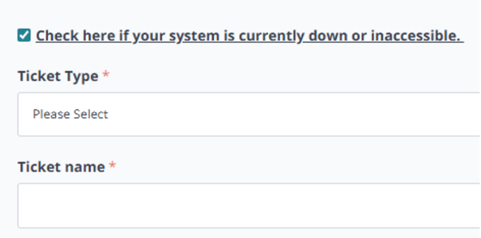
- System down or inaccessible issues: Be sure to select the appropriate option to trigger our escalation process.
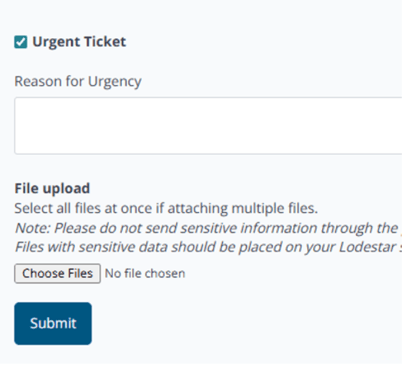
- Urgent or time-sensitive issues: Mark the ticket as urgent and include the reason.
- General guidance or “how-to” questions: Check the Lodestar Knowledgebase first. You may find an immediate answer.
- System down or inaccessible issues: Be sure to select the appropriate option to trigger our escalation process.
This structure helps keep requests moving efficiently and ensures nothing falls through the cracks.
4. Keep Communication Open
Once troubleshooting begins, our team may reach out with follow-up questions or requests for additional information. Quick responses can make the difference between resolving an issue in hours versus days.
If something changes on your end, such as the issue resolving itself, new details surfacing, or priorities shifting, letting us know right away helps keep everything moving forward.
5. Share Your Wins (and Your Woes)
We love hearing how teams are using Lodestar in the real world.
When something works well, that feedback helps us understand what’s delivering the most value. When something doesn’t, it helps guide future improvements. Some of our most impactful product enhancements have come directly from client insights.
Your feedback doesn’t just improve support. It helps shape what we build next.
6. Remember: We’re on the Same Team
Data analytics is complex. Between integrations, calculations, and visualizations, there’s a lot happening behind the scenes.
When challenges arise, our goal is always collaboration, not finger-pointing. You bring the business context. We bring the technical expertise. Together, we make the data work for you.
The Bottom Line
Clear context, open communication, and shared goals lead to better outcomes for everyone.
So the next time you reach out to support, remember: a little extra detail goes a long way. Clear communication leads to better outcomes for your team and ours.